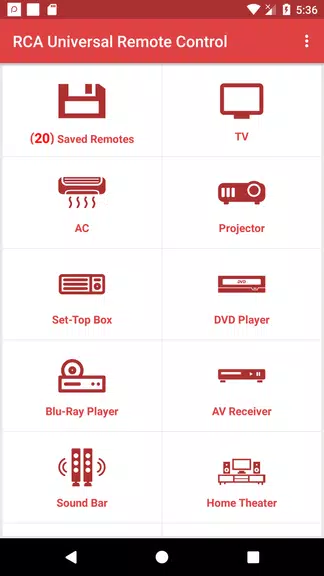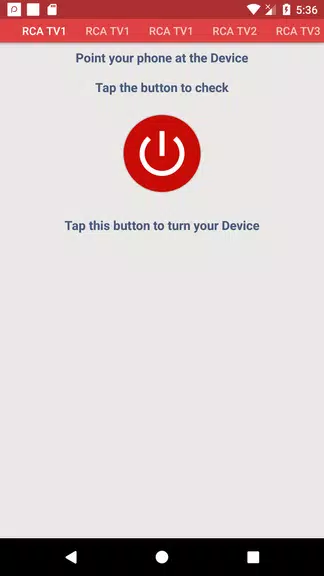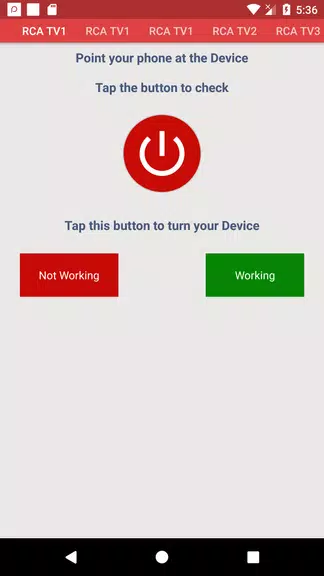
Effortlessly manage all your RCA devices with the RCA Universal Remote App. Its compact size ensures quick installation, even on slower internet connections. Just follow the straightforward two-step guide—supported by helpful screenshots—to set it up. Once paired with a device, the settings are saved permanently in the "Saved Devices" section for future use. This intuitive app works with multiple devices, delivering all the functions of your original remote right in the palm of your hand.
Key Features of the RCA Universal Remote:
⭐ Quick Installation: Our app has one of the smallest file sizes available, allowing fast and easy installation, even on slower networks.
⭐ Easy Setup: Use the simple two-step instructions and included screenshots to configure the RCA Universal Remote App without hassle.
⭐ One-Time Setup: After pairing the app with your RCA device, no further setup is needed for that device.
⭐ Saved Devices: All configured devices are stored in the "Saved Devices" section for instant access at any time.
⭐ Multi-Device Support: Pair and manage multiple devices—all conveniently listed in the "Saved Devices" area.
⭐ Complete Control: The app offers every feature found on your original manufacturer remote.
Frequently Asked Questions:
⭐ Do I need an IR blaster to set up the app?
Yes, the app requires a built-in IR blaster to configure and control your devices.
⭐ Can I connect more than one device?
Yes, you can pair multiple devices, and each will be saved in the "Saved Devices" section.
⭐ Do I have to set up the app each time I use it?
No—once a device is configured, the app remembers your settings for later use.
Final Thoughts:
Thanks to quick installation, simple setup, and the ability to store multiple devices, the RCA Universal Remote App offers a smooth and user-friendly way to operate your RCA electronics. Skip the repetitive setup steps and enjoy seamless control—download the app today!